

Certes TrustNet Manager™
15031
wp-singular,page-template-default,page,page-id-15031,wp-theme-bridge,bridge-core-3.3.4.4,qode-optimizer-1.0.4,qode-page-transition-enabled,ajax_fade,page_not_loaded,,qode-theme-ver-30.8.8.4,qode-theme-bridge,disabled_footer_top,disabled_footer_bottom,qode_header_in_grid,wpb-js-composer js-comp-ver-8.6.1,vc_responsive

Certes TrustNet Manager™

Group Encryption Management for Policies, Keys and Devices

Product Overview

Certes TrustNet Manager™ is a web-based management platform that simplifies security management while preserving network performance and functionality. It provides a browser based user interface for managing policies and devices and for distributing keys for group encryption deployments. TrustNet Manager offers simplified encryption management without requiring costly changes to your existing network infrastructure.


With Certes TrustNet Manager, users can:

• Manage network encryption from anywhere using a web-based interface
• Define and distribute security policies with drag-and-drop simplicity
• Separate security management from network management
• Review and audit system events to simplify regulatory compliance
• Automatically validate changes before deployment


Policy Management

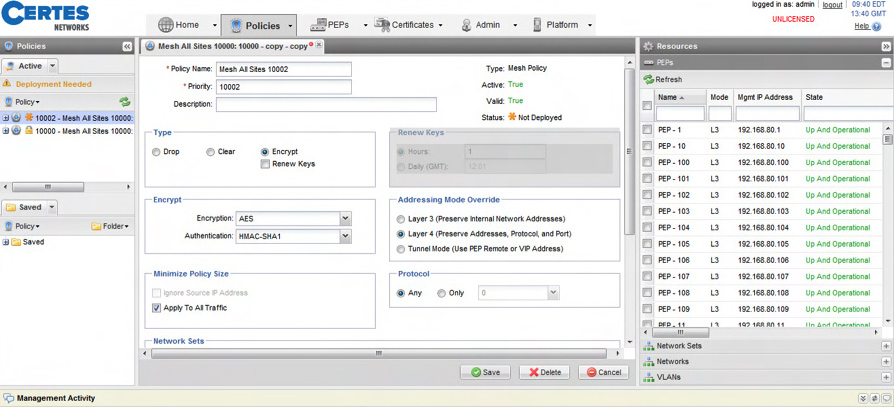
Certes TrustNet Manager acts as the central point of control for security personnel to define policies for what traffic to protect and how to protect it. Policies identify which network traffic to encrypt (based on any combination of VLAN ID, IP address, port information, or protocol ID) and specify what to do with it (encrypt, send in the clear or drop).
certes-policies


Encryption Key Management

Certes TrustNet Manager reliably distributes the group encryption policies and keys to Certes Enforcement Points (CEPs) throughout the network and it periodically sends key updates (rekeys). Key updates minimize the risk of a brute-force attack on the encrypted data by reducing the amount of information encrypted with the same key. With TrustNet Manager’s fail-safe rekey feature, group keys are updated only when all of the group members are ready to receive the new key. This avoids network outages that occur when some group members receive a new key while other group members continue to use the old key.

Certes TrustNet Manager helps you avoid costly misconfigurations and network outages by checking policies for mistakes and misconfigurations before new policies are deployed. It also deploys policy changes only to enforcement points that require changes.


Security Management

Using role-based access control, Certes TrustNet Manager provides separate roles for security control and network management. This allows the security team to outsource network management without losing control of the security policies and keys. TrustNet Manager provides powerful logging and auditing capabilities to establish, maintain and prove regulatory compliance. TrustNet Manager also provides user-specific customizable dashboards and a dashboard to show device status as shown below.

TrustNet Manager Architecture

TrustNet Manager is built on a web-based three-tier architecture with clustering, disaster recovery and multi-tenancy included in the design from the beginning. The user interface provides multiple users with the ability to configure vCEP and CEP appliances and to define group encryption policies. TrustNet Manager handles policy and key generation and distribution to the vCEP and CEP enforcement points. Clustering provides redundancy and allows the system to scale linearly while the DR site capability provides additional redundancy. Service providers can offer encryption services to multiple end customers using a single instance of TrustNet Manager through the use of its built-in multi-tenancy capability.

certes-archi

Licensing

A single license for Certes TrustNet Manager Software is included with TrustNet VSE and FSE Software licenses. The TrustNet Manager Software license can be applied to one server, and it includes a license for one active user. Additional clustered servers and disaster recovery servers can be added in order to provide additional scalability and redundancy. Each additional clustered server requires an additional cluster license, and each additional disaster recovery server requires an additional disaster recovery license. Each active TrustNet Manager user requires the purchase of an additional user license or mobile user license. User licenses are based on active users rather than named user accounts, so only the total number of simultaneous active users and mobile users need to be licensed.


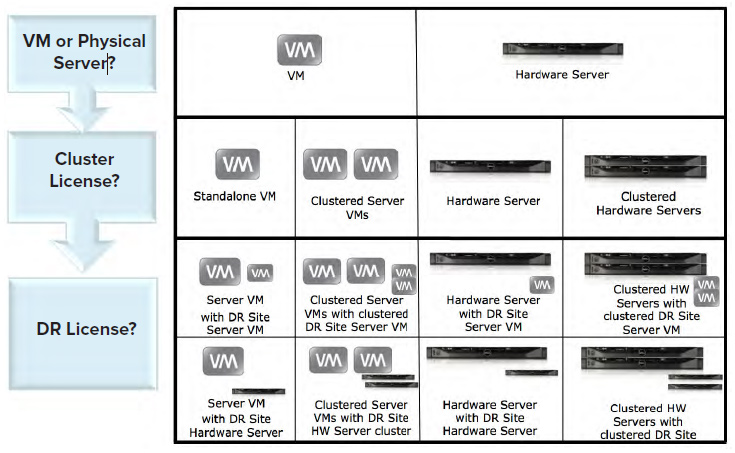
For each server license purchased, customers can choose to deploy one of two available virtual server editions or a physical server. Please refer to the Configuration and Deployment section of this brochure for guidelines in choosing the correct edition for your deployment. Deployments of clustered and disaster recovery servers can be mixed among virtual and physical servers as shown in the table below.

Deployment Options

Certes TrustNet Manager reduces the cost of deploying a clustered server infrastructure by offering customers a choice of physical or virtual servers. Virtual servers can be used to cost-effectively deploy TrustNet Manager to an existing VMWare server or even to a laptop running VMWare Player.

certes-deploy

Configuration and Deployment

The detailed specification of the laptop, virtual machines and physical server configurations are shown below.

Standalone Edition

(laptop or desktop-based virtual machine)

Certes TrustNet Manager pre-installed on a virtual machine for standalone deployments. Additional servers for clustering or disaster recovery are not supported for this configuration.


Recommended for smaller deployments on a laptop or desktop computer with few available resources or machines that have 32-bit processors.
DHCP-assigned IP address by default (can be configured for static IP address)

Desktop or laptop machine running the latest major release of VMWare Player or VMWare Workstation.

Host Operating Systems:
Microsoft Windows: 7, Vista, Server 2008, Server 2003, or XP
Linux: RedHat, SUSE, CentOS, Ubuntu and others (please refer to the latest VMWare specifications for the full list of supported operating systems).
CPU: Intel x86 Pentium-class 2 GHz or equivalent
Memory: 1 GB of RAM
Disk: 20 GB of disk space available DVD includes:

  • 32 bit VMWare Virtual Machine (1 GB RAM, 20GB HDD) • (for VMWare Player or VMWare Workstation) with TrustNet Manager and database pre-installed with a DHCP-assigned IP address
  • Documentation

Server Edition

(server-based Virtual Machine)

Certes TrustNet Manager pre-installed on a virtual machine (VM) for deployments of any size that require clustered or disaster-recovery servers.


This virtual machine can be used as a standalone, cluster or disaster recovery server by configuring the server at installation time.

Server-class machine running the latest version of VMWare ESX, ESXi, or vSphere.
Host Operating System: VMWare ESX, ESXi, or vSphere
CPU: Intel x64 Xeon 2 GHz or equivalent
Memory: 2 GB memory available
Disk: 40 GB of disk space available

DVD includes:

  • A 64 bit VMWare Virtual Machine (2 GB RAM, 40GB HDD)
    (.OVA file that is deployed as an OVF template for VMWare ESX) with TrustNet Manager and database pre-installed with a statically-assigned IP address
  • Documentation

Hardware Server

Certes TrustNet Manager pre-installed on a physical server*.
Designed for any size deployment that requires a physical server, or deployments that require a hardware security module (HSM).
* Physical server (part number TRUSTNET-MGR-HW) must be ordered in addition to TNM-SW software license(s)

Server includes:

  • Pre-installed TrustNet Manager and database with a • statically assigned IP address
  • Redundant installation of TrustNet Manager on a second • drive (for recovery purposes).

DVD includes:

  • Documentation

Certes TrustNet Solution

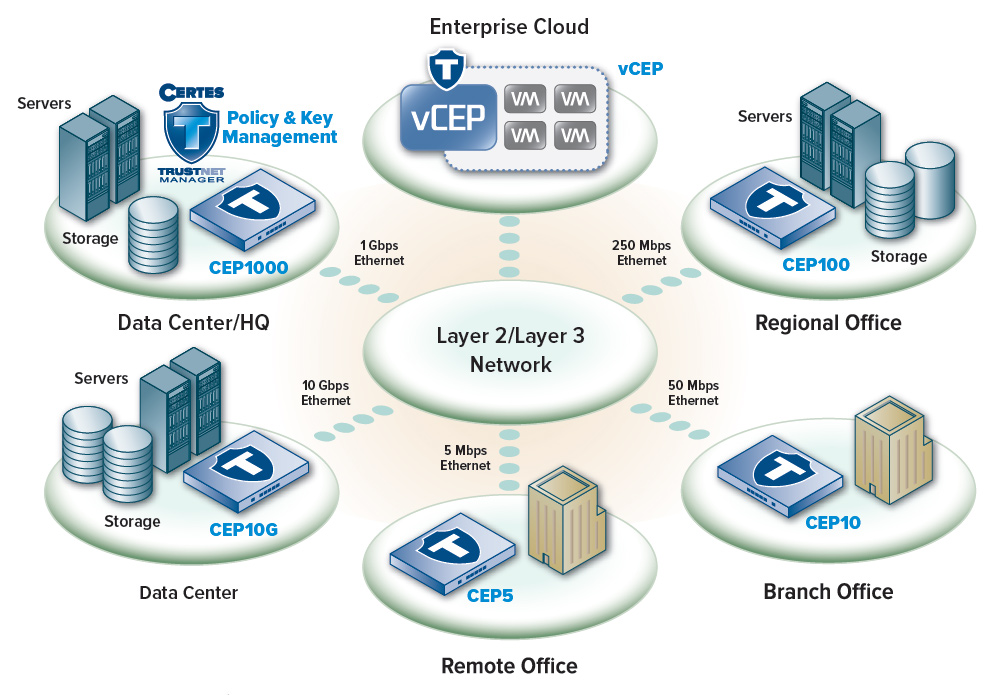
TrustNet Manager is an integral part of the Certes TrustNet Solution for network encryption and authentication that spans from the edge of the network to the IaaS cloud.

certes-solution